The pupil who can't right the boat
A child alone in an Optimist, a light crew in a Feva, a beginner tired after an hour on the water. Well-trained crews right a 90° capsize in under a minute. A beginner still down after two minutes needs help.
Internal draft, confidential: not for publication before the patent filing. "SailNav Tell" is a working name.
A small orange buoy on the transom of every training dinghy. When a boat capsizes, it releases itself, floats up on a short leash and tells the instructor at once: which boat, where, and how long it has been down.
In development · design rev 0.2 Option for the SailNav Clip

Capsizing is part of learning to sail. Most pupils are back up in a minute. The dangerous ones are the few who are not, and in a gust they rarely come one at a time.
A child alone in an Optimist, a light crew in a Feva, a beginner tired after an hour on the water. Well-trained crews right a 90° capsize in under a minute. A beginner still down after two minutes needs help.
The first minute in cold water is cold shock. Useful strength in the hands and arms goes within about ten minutes. Alpine and northern lakes are around 8–10 °C in April, just when the school season starts.
An instructor watches six to twelve boats while coaching, and looks away to help one pupil at a time. A squall can put half the fleet over at once. Which boat has been down longest?
Upside down, a white hull is low and flat in the waves. US Sailing's entrapment study notes that a turtled boat "may be invisible to other crews". Turtling and entrapment are the cases that turn a lesson into an emergency.
A rented dinghy may be out of sight of the beach hut. Staff only find out about a capsize when the boat is late back, or when someone phones.
SailNav Tell sits on the transom of every boat. When a boat capsizes, it floats up on a short leash and tells the instructor at once, and it keeps telling until the boat is back up.
Tell is a sealed, self-righting alert buoy the size of a grapefruit. It rides in a holder on the transom while the boat sails, and does its job when the boat goes over.

Its own motion sensor feels the boat heel while docked. Water contacts, GNSS and a cellular modem are inside. It needs no wires and no other device on board.
An electro-permanent magnet holds it through the shell wall. On a capsize it switches off, and the buoy floats or drops out of its open seat. No latch, no spring, nothing to jam with sand.
A 0.8 m floating leash keeps it right behind the transom, even when the hull is upside down. A weak link at the boat end lets go at about 80 N if anything catches.
Ballast low, foam high: it rights itself from any angle and still floats if it is ever flooded. The antennas and the strobe ride above the water.
Fluorescent orange, a retro-reflective band, a boat-number label and a fleet-colour collar. The strobe flashes white when capsized and amber when escalated.
Two gold ring contacts: drop it on a rack seat at any angle and it charges. One charge covers about five school days plus a 24-hour alarm reserve.
Seen from astern: an Optimist with the SailNav Clip on the mast and Tell in its holder on the transom quarter.

Tell rides docked and armed in its holder. It feels the boat's heel itself, and compares notes with the SailNav Clip on the mast over Bluetooth.

Heel beyond 95° for 5 s, or beyond 70° with the holder in the water for 3 s. Hard hiking, gusts and a crash tack stay below these rules.

The magnet lets go. The buoy rises to the surface on its 0.8 m floating leash, right behind the transom, strobe flashing white.

Over LTE-M (or LoRaWAN) to SailNav Cloud: a card in the instructor app and on the shore dashboard with boat, position, time down and water temperature.

The Clip on the mast is upright and out of the water again, and tells the floating buoy over Bluetooth. The buoy is still on its leash behind the transom.

A green "recovered" message with the time down goes to everyone. The pupil or the instructor clicks the buoy back into its seat, and it is armed again.
Buoy movement alone never clears an alarm: a buoy towed away by another boat raises "buoy detached, check" instead.
Tell works on its own. It detects the capsize and alerts with its own sensors and radio. Only the "recovered" message then comes from re-docking the buoy or from the instructor, and the session detail (speed, heel, tacks) is not available.
Most capsizes end well in a minute, and instructors don't want a phone that buzzes at every one. Tell reports every capsize, and escalates only the ones that are not getting better.
Buoy releases, strobe flashes white. A yellow card appears on the dashboard and in the app: boat, time, heel, position, water temperature. Phones stay silent.
Most boats are back up here. A green card with the time down, then nothing more to do.
Still capsized. Push and vibration on every instructor phone and on the RIB. The strobe turns amber, so the RIB driver can see from the water which boat needs him first. One tap on "RIB on the way" tells everyone who is going.
Assistance. Push, SMS and a call cascade to the shore duty officer, until someone acknowledges.
In cold water the red step comes at half the time (2:30 with the defaults). The buoy measures the water temperature itself.
An upside-down boat is escalated immediately, and to red after T1. Entrapment under the hull or in the rig is the scenario that matters most.
T1 and T2 are set per group: e.g. 2 min / 5 min for beginners, 3 min / 6 min for advanced crews. "Drill mode" logs deliberate capsize practice and delays the escalation threefold.

No radio gets through more than a few centimetres of sea water. In a turtle the Clip on the mast is deep under water and silent. Only something that floats free keeps its antenna in the air: Tell sits on the surface right behind the transom, on its 0.8 m leash.
| Situation | What Tell sees | What happens |
|---|---|---|
| Hard hiking, gusts | Heel 30–60°, brief peaks towards 70° | Nothing: below the thresholds, and a 5 s dwell |
| Crash tack, gybe, broach | Spike up to 90° for less than 2 s | Nothing: dwell time, and the roll must settle |
| Capsize drill | A real capsize, on purpose | Drill mode: logged for the debrief, escalation delayed |
| Boat on its side on the beach, or upside down on a trolley | 90° or 180°, dry, no motion, inside the shore zone | Nothing: ashore rule (disarmed) |
| Buoy knocked out of the holder | Released while the boat is upright | Info "buoy released, boat upright": re-dock it |
| Swamped Optimist, still upright | Wet, heel under 30° | Not a capsize (optional "swamped" info) |
Thresholds are starting values, to be tuned in the field trial. Target: fewer than one false amber alarm per 100 boat-hours target.
On a SailNav Clip boat the two work as a team over Bluetooth. Tell carries the radio to the cloud; the Clip adds its sensors and knows when the boat is really back up.

| Link | What flows | When |
|---|---|---|
| Clip to Tell Bluetooth LE | Heel, how deep the Clip is (barometer), "upright and in air", boat and pairing | While both are in air: sailing, and often at 90° |
| Tell to SailNav Cloud LTE-M / NB-IoT, or LoRaWAN | Event (capsize, turtle, not recovered, recovered), boat ID, heel, water temperature, position, battery. A message of about 20 bytes | At once on an event, repeated every 60 s until received; heartbeat every 10 min afloat |
| Cloud to people | Push, SMS and call cascade; live fleet map | By escalation level |
| Clip session log to Cloud | Track, speed, heel, tacks and gybes for the debrief | After the session, through the SailNav app planned |
In a turtle the Clip is deep under water, and no radio reaches it. Tell does not wait for it: it decides on its own heel (felt while docked), the wet holder and its GNSS. In sea water, a Clip that goes silent right after a capsize is itself a sign of a turtle.
Tell works on any boat on its own: capsize detection, release, position and alerts need nothing else. Rental and school boats can start with Tell only and add a Clip later. Without a Clip, "recovered" comes from re-docking the buoy or from the instructor.

Before the start, the Clip shows that its boat's Tell is docked and armed. After a capsize it reminds the pupil to re-dock the buoy.
The holder stays on the boat all season. The buoy lives on the charging rack in the boat shed, and goes on the boat with the rest of the kit.

Outside of the transom, on one quarter, at least 250 mm from the centreline: clear of the rudder, tiller and gudgeons. Seat centre about 110 mm below the deck edge. The buoy stands out about 115 mm aft.
GRP hulls: 4 × M5 A4 through-bolts with a backing plate, or VHB tape. PE hulls (Feva, Topper): bolts with a large backing plate or well-nuts, or a no-drill strap bracket. Holder 40 × 162 × 148 mm, about 98 g CAD.
The boat holder, the desk cradle and every seat of the shore rack share the same seat: a shallow spherical lip, a steel strike plate for the magnet and two spring contacts. The buoy sits in any rotation.
Charged overnight: its strobe is off when full. Take the buoy with the boat's number.
Snap the leash swivel to the bottom lug, set the buoy in its seat. A green double blink means seated.
Pairing is done once per season (QR code). The app shows every buoy of the session as armed.
Buoys arm themselves when they leave the shore zone, or when the instructor opens the session.
Unclip the snap (the leash stays on the boat) and drop the buoy on its seat. Rinse after sea water.
Ten seconds, part of the rigging check.

A capsize alert must never become a hazard itself. We modelled how capsized dinghies and buoys drift in a training fleet, and designed the leash around the result.

| Case | 3 m line | 0.8 m leash |
|---|---|---|
| Boats crossing the line zone, dense drill (5 m apart, 2 min) | 11.8 | 0 with 1 m clearance |
| Neighbours' leash zones overlapping in a mass capsize | 90 % | 17 % (hulls touch: 9 %) |
| RIB from leeward, prop within 1 m of the line: Optimist / ILCA | 44 / 39 % | 0 / 22 % |
First-order model from our design study; to be verified in drills with other boats and the RIB during the pilot.
Three number labels (18 mm digits) for all-round reading, a snap-on collar in the group's colour, a retro-reflective band for dusk, and a QR code for pairing. The app shows the same number and colour.
When several boats are over, the strobes tell the RIB driver from the water: white flash = capsized, amber = escalated or turtled. A "find me" rapid flash can be triggered from the instructor app.
Designed for training fleets of 6–20 boats per group and schools of 10–40 boats, with a 10-seat shore rack per group. Each buoy is paired to one hull and one number.

Every Tell reports to SailNav Cloud: a live fleet map for the club house, a boat-by-boat debrief after the session, and an alert card on every instructor's phone. The screens below are mockups with simulated data (names are fictitious); tap any screen to open it full size.
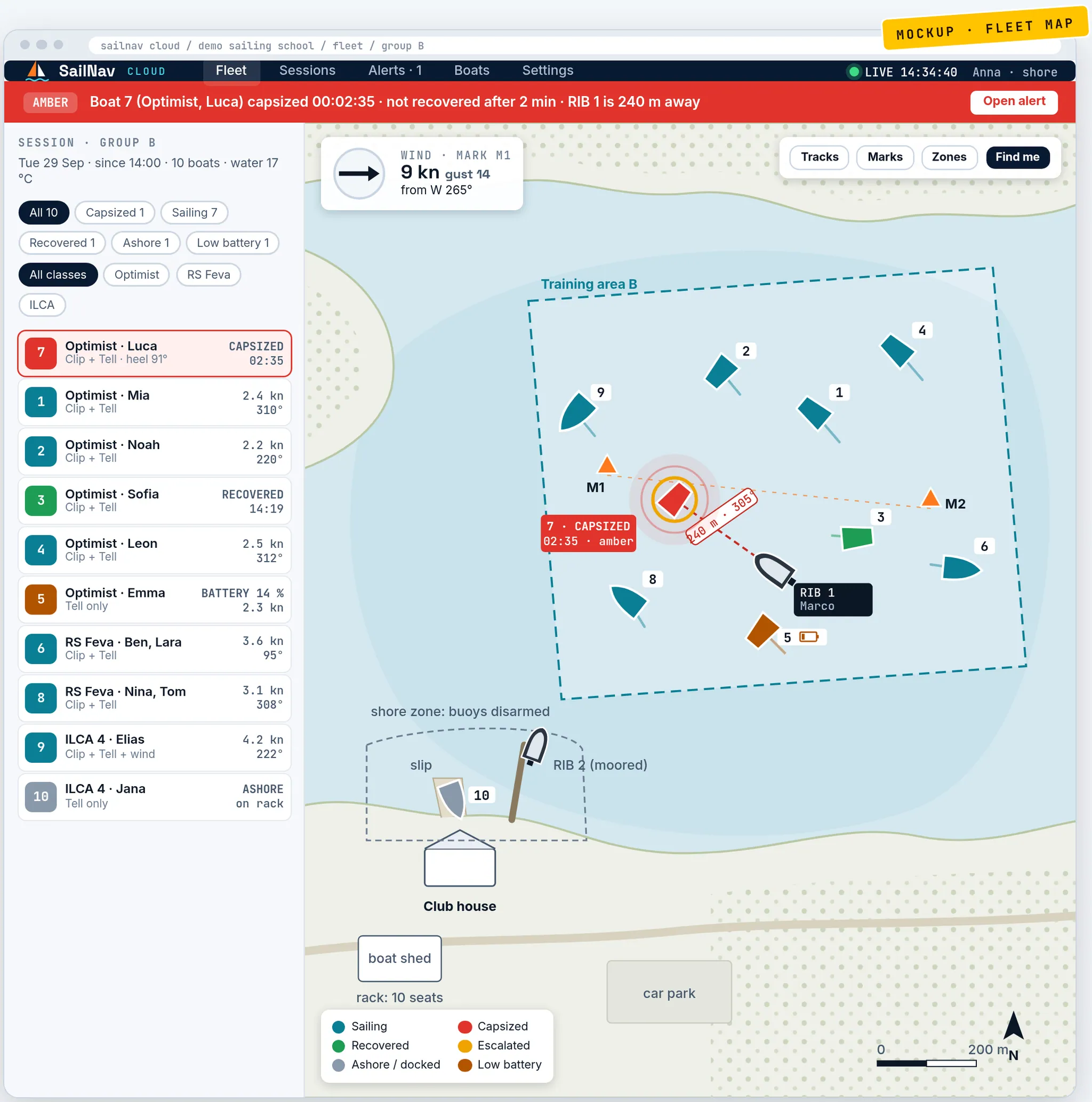
Live positionsIn fleet-tracking mode each Tell reports its position every 10–30 s planned option; boats with a Clip add speed and heading. Stylised lake drawn for this mockup.
Status at a glanceColour by state, the boat's number, class and crew, and the time down for any capsized boat. Filters by state and class.
Distance from the RIBThe coach boat's own position gives the distance and bearing to every capsized boat.
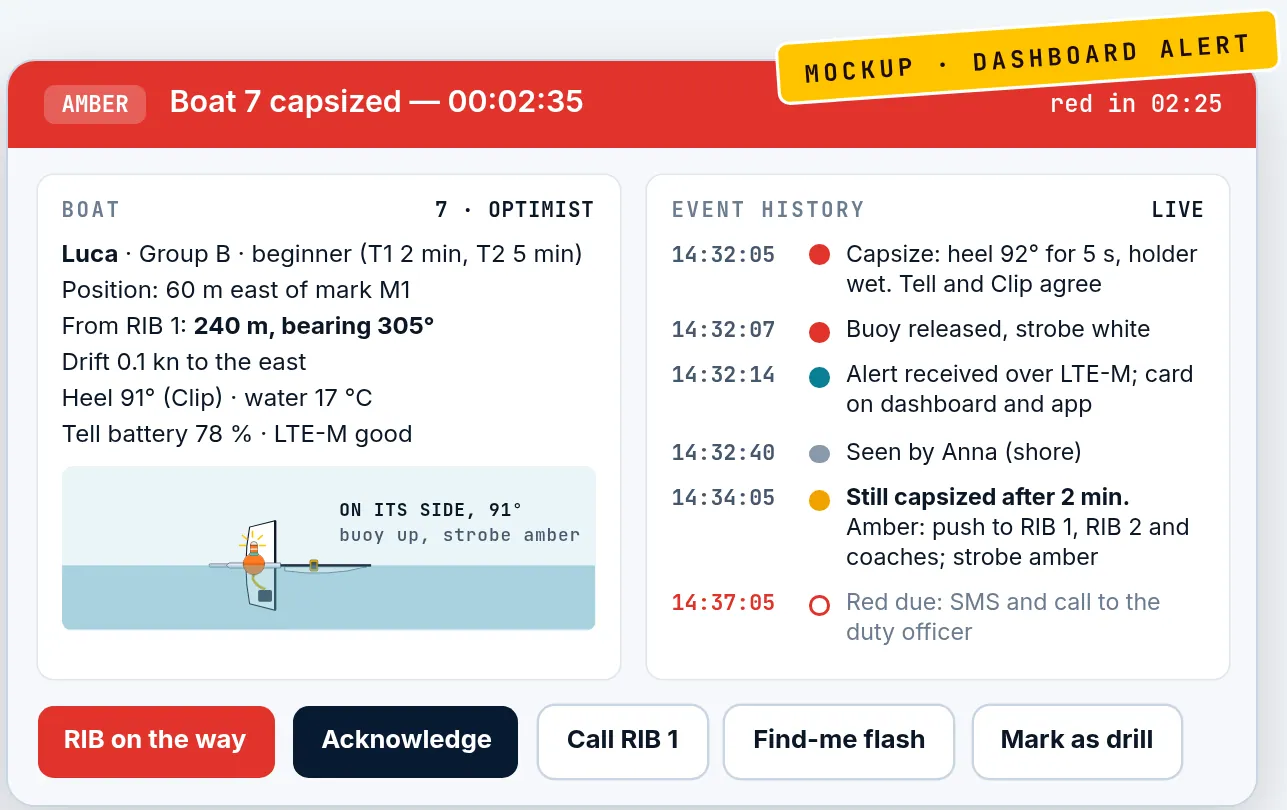
The alert tells the instructor what matters in the first seconds: which boat, where from the RIB, how long it has been down, and how long until it escalates. One tap tells everyone that help is on the way.
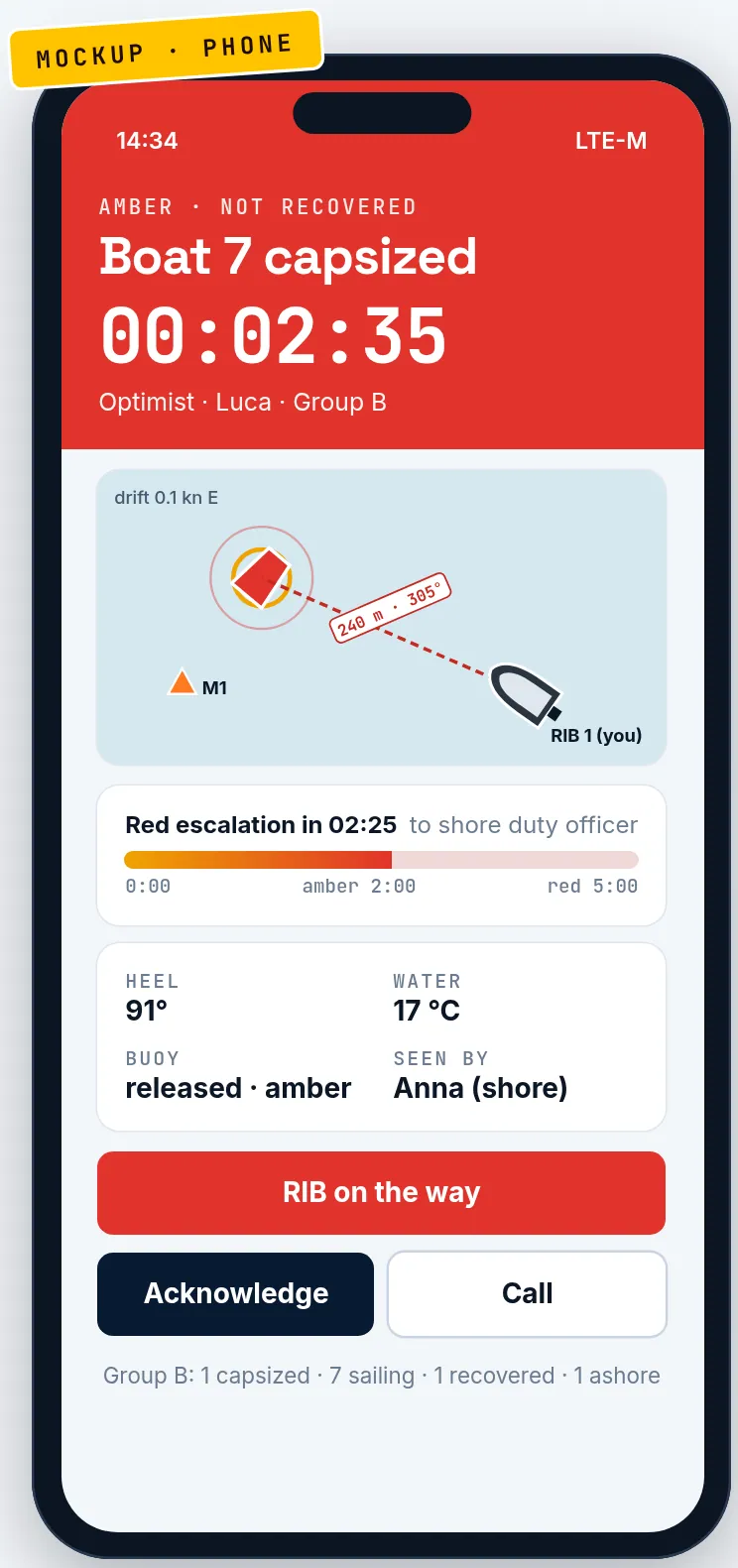
At once. Card on the dashboard and in the app, boat on the map. Phones stay quiet. Strobe white.
After T1 (2 min), or at once for a turtle. Push and vibration to all instructors and RIBs. Strobe amber.
After T2 (5 min), half that in water below 15 °C. SMS and call cascade to the shore duty officer.
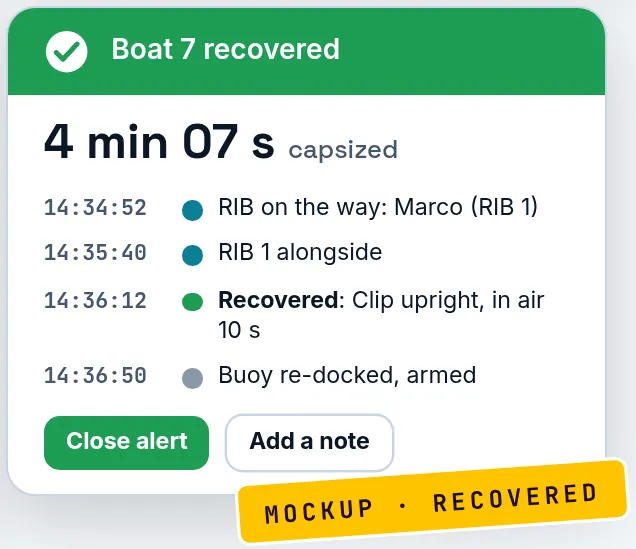
Boat upright again. Time down to everyone, strobe off, event into the session log for the debrief.
Every session becomes a debrief. With a SailNav Clip on the mast, the coach sees each pupil's track, speed, heel and manoeuvres, and every capsize with its time to recover.
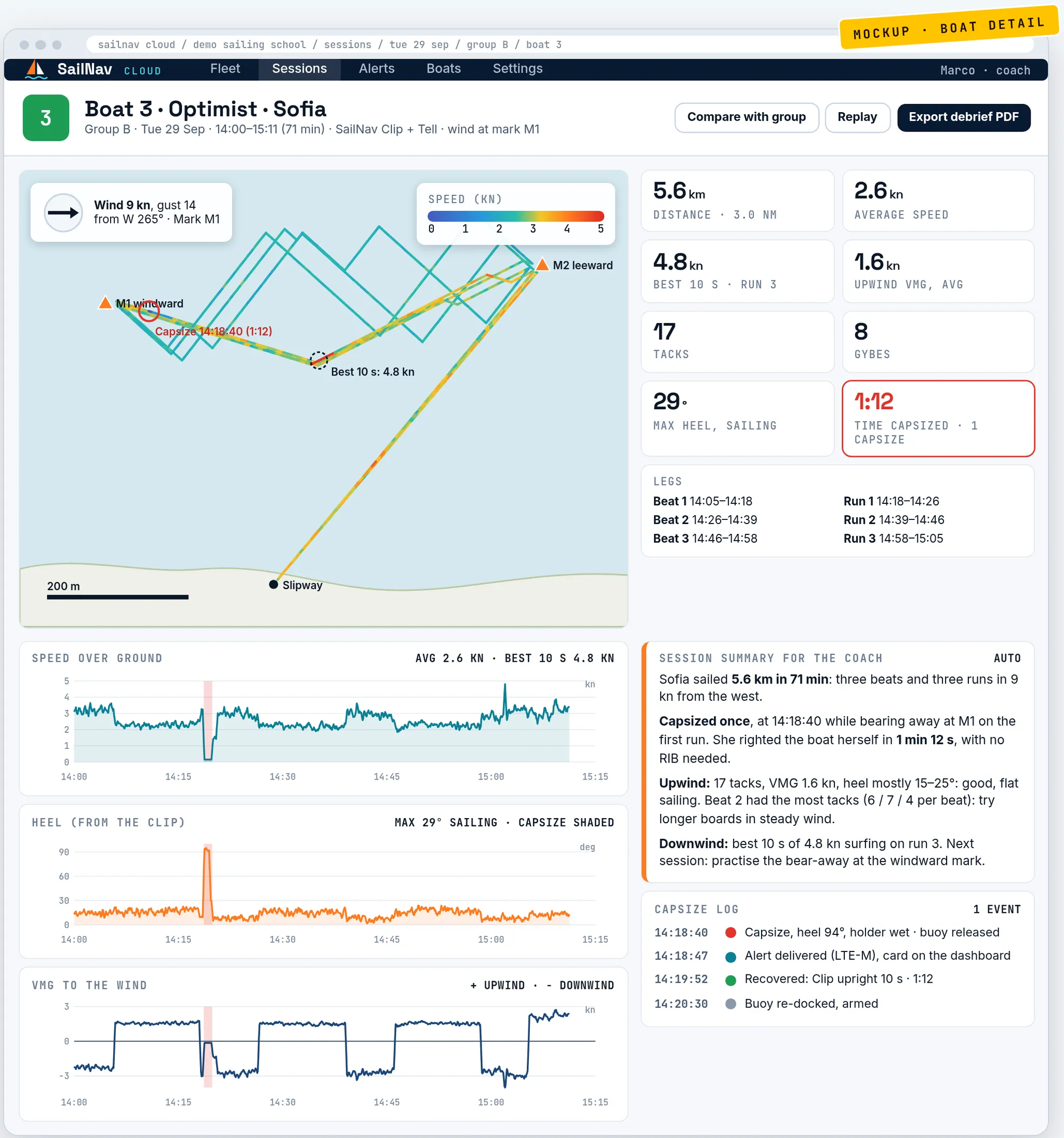
Mockups with simulated data; names are fictitious. Push notifications and call cascades depend on the phone's settings and network coverage. SailNav Tell is a supervision aid, not a certified life-saving device.
Pre-production data from design rev 0.2. CAD = from the 3D model; model = first-order calculation; target = design goal, to be verified by testing. Specifications may change.
| Buoy | |
|---|---|
| Type | Tethered capsize-alert buoy. Stowed in a transom holder, released on capsize |
| Size | Ø 110 mm sphere with a Ø 34 mm radome; 150 mm tall CAD |
| Mass | 352 g with snap swivel CAD |
| Buoyancy | 720 gf in fresh water, safety factor 2.05; self-righting from any heel; still floats when flooded CAD |
| Housing | UV-stable ASA, fluorescent orange; clear PC radome cap; bayonet joint with radial O-ring and lock screw; pressure vent. IP68 (2 m, 1 h) target |
| Visibility | 3 boat-number labels, fleet-colour collar (6 colours), SOLAS retro-reflective band; strobe under the cap: white = capsized, amber = escalated target |
| Sensing | 6-axis motion sensor (heel while docked), water contacts (wet / dry, fresh / sea), dock sensing, water temperature, GNSS |
| Release | Electro-permanent magnet through a 1 mm wall onto a steel plate in the seat; no moving parts. Holding force at least 40 N target, bench test |
| Link to the cloud | LTE-M / NB-IoT with integrated GNSS (standard); LoRaWAN EU868 variant for clubs with a gateway. Short event messages, repeated until received |
| Link to the boat | Bluetooth LE to the SailNav Clip; "find me" flash from the instructor app |
| Battery | LiFePO4 18650, 1500 mAh, with protection and temperature sensor. Design case: 5 school days + 24 h of alarm, with a ×4 margin model |
| Charging | Two concentric gold ring contacts, any rotation; about 3.5 h for a full charge; 0–45 °C model |
| Holder, leash and charging | |
| Holder | Ribbed ASA-GF seat with leash pocket, 40 × 162 × 148 mm, about 98 g kit CAD. Buoy stands 115 mm aft of the transom |
| Fixing | GRP: 4 × M5 A4 with backing plate, or VHB tape. PE hulls: through-bolts or well-nuts; strap bracket where drilling is not allowed |
| Leash | 0.8 m floating 5 mm polypropylene, yellow; ball-bearing snap swivel at the buoy; sacrificial weak link (cable tie, 80 N minimum) at the boat end, spares in the pocket |
| Desk cradle | Same seat, USB-C 5 V, anti-tip steel base, 475 g |
| Shore rack | 10 seats on an 800 × 510 mm HDPE panel for wall or post; IP67 5 V power supply, fused per seat; about 5.8 kg. Passive: every buoy shows its own charge state |
SailNav Tell buoy with collar and number labels · transom holder with strike plate and leash pocket · 0.8 m leash with snap swivel · 3 weak-link ties · fixing kit for the hull type
10-seat shore rack with power supply, or a desk cradle per buoy for small fleets
SailNav Cloud dashboard and instructor app: fleet map, alerts and escalation, session debrief, per-group settings, shore zone, drill mode
Alerts go to the rental desk, with a geofence-exit alert and a "not back by" time. Tell works without a SailNav Clip.
Pricing for kits, racks and the SailNav Cloud service is not set yet: prices on request.
| Class | Transom | Where the holder goes | Fixing | Class racing |
|---|---|---|---|---|
| Optimist | GRP, flat and vertical | Either quarter, 250–350 mm off the centreline | 4 × M5 + backing plate, or VHB | Training: yes. Racing: only if the notice of race or sailing instructions allow it |
| ILCA 4 / 6 / 7 | GRP, near-vertical, slight curve | Quarter below the traveller fairlead, clear of the drain bung | M5 + backing plate, or VHB | ILCA rules allow safety equipment required by an authority |
| RS Feva | Rotomoulded PE | Quarter, clear of the righting-line hooks and drains | Through-bolts with a large backing plate, or well-nuts | Class rules allow additional safety equipment |
| 420 / Club 420 | GRP, gently curved | Quarter, above the drain flaps | M5 + backing plate, or VHB | Training: yes. Racing needs an exemption |
| Topper | PE, small transom, no holes allowed | Quarter; compact holder variant if space is tight | No-drill strap bracket, or bonding after a test | Racing: class approval needed |
From a desk study of class rules and rigging guides; to be checked on real boats in the pilot. Other school classes (Pico, Tera, Bahia and more) on request. Class rules change: check the current version before racing with a holder fitted.
SailNav Tell is not a certified life-saving device. It is not a personal locator beacon (PLB), an EPIRB, an AIS man-overboard device or a buoyancy aid, and it does not call the rescue services. It is an aid to the instructor's supervision.
It does not replace a safety boat, qualified instructors, the instructor-to-pupil ratios of the school or the national authority, buoyancy aids, or the school's own safety procedures. Alerts depend on radio coverage, battery charge and correct fitting, and can be delayed or missed.
Pupils' positions are personal data: SailNav Cloud records positions only while the boats are afloat, and each school sets its retention time planned.
The floating dinghy display on the mast: GPS, heel, compass and barometer. Tell's partner on the boat.
SailNav ClipA wireless masthead wind sensor that powers itself from the wind it measures, and floats. Part of SailNav Clip.
The wind headThe instrument system for keelboats of 6–10 m, for the club's cruisers and the instructors' own boats.
SailNav CrewNo. Tell detects the capsize, releases, and alerts with its own sensors and radio. With a Clip on the mast you also get an automatic "recovered" message when the boat is back up and the session detail (speed, heel, tacks) for the debrief. Without one, "recovered" comes from re-docking the buoy or from the instructor.
No radio gets through more than a few centimetres of sea water. In a turtle the mast is deep under water and the Clip is silent. Only something that floats free keeps its antenna in the air, so Tell sits on the surface right behind the transom on its 0.8 m leash.
No. The rules need a heel beyond 95° for 5 s, or beyond 70° with the holder in the water for 3 s. Gusts, hiking and crash tacks stay below these rules, boats ashore are disarmed, and capsize drills can be logged in drill mode. Our target is fewer than one false amber alarm per 100 boat-hours; the thresholds will be tuned in the field trial.
No. Every capsize appears as a card on the dashboard and in the app, but phones stay quiet. They vibrate only from amber up: a boat still capsized after T1 (2 min by default), or a turtle, at once.
The leash is only 0.8 m long so the buoy stays in the shadow of its own hull; in our fleet model boats that keep 1 m clear never cross it. If anything does catch, the weak link at the boat end lets go at about 80 N, and a 352 g float cannot hold anybody.
Yes, over LTE-M / NB-IoT where there is mobile coverage, or over LoRaWAN with a gateway on the club house or the coach RIB. Fresh and salt water behave very differently for radio, which is why we want pilots on both.
Drop the buoy on a seat of the shore rack or the desk cradle, in any rotation: two gold ring contacts charge it in about 3.5 h. One charge covers about five school days plus a 24-hour alarm reserve (model).
No: SailNav Tell is an aid to the instructor's supervision, not a certified life-saving device, PLB or EPIRB (see the safety note). It is in development and not for sale yet; pricing for kits, racks and the SailNav Cloud service is not set. Pilot terms on request.
We are looking for sailing schools to try SailNav Tell on their own boats and lakes before it goes on sale. You help us get it right; your instructors are the first to have it.
6–20 boats: a training group with its instructors and at least one safety boat. Lake or sea: we want pilots on both. Pricing: on request, pilot terms on request.
SailNav Tell is a product in development (design rev 0.2): not for sale, no price set, all figures are design targets, CAD values or model estimates and will be verified on prototypes. Screens are mockups with simulated data; names are fictitious. SailNav Tell is a supervision aid, not a certified life-saving device. "SailNav Tell" is a working name, trademark clearance pending.
We are preparing our Kickstarter campaign. Leave your e-mail and we will tell you the day it goes live, with all the details of the early-backer rewards.